

How long a day stays editable
Set how long people can keep editing a past day in their time diary, how long a reopened day stays open, and whether weekends and holidays count towards either.
What you can do here
- Decide how long people can keep filling in a day after it has ended.
- Decide whether saving a day closes it there and then, or leaves it editable.
- Decide how long a day stays open once a manager has reopened it.
- Decide whether weekends and public holidays count towards either of those.
- See how many days you are about to close before you close them.
Why this exists
People forget to log time. Left open forever, a time diary can be edited months later, and any report built on it stops meaning anything. Closed too soon, people lose hours they genuinely worked.
There is no right answer to that trade — it depends on how your company works. So Kaizen does not have a fixed deadline. You set it, and what you set here is what everyone sees on their own time diary.
Where to find it
Open Admin and find Time Diary Settings in the settings rail. You need permission to manage attendance settings; without it the screen is not in your rail.
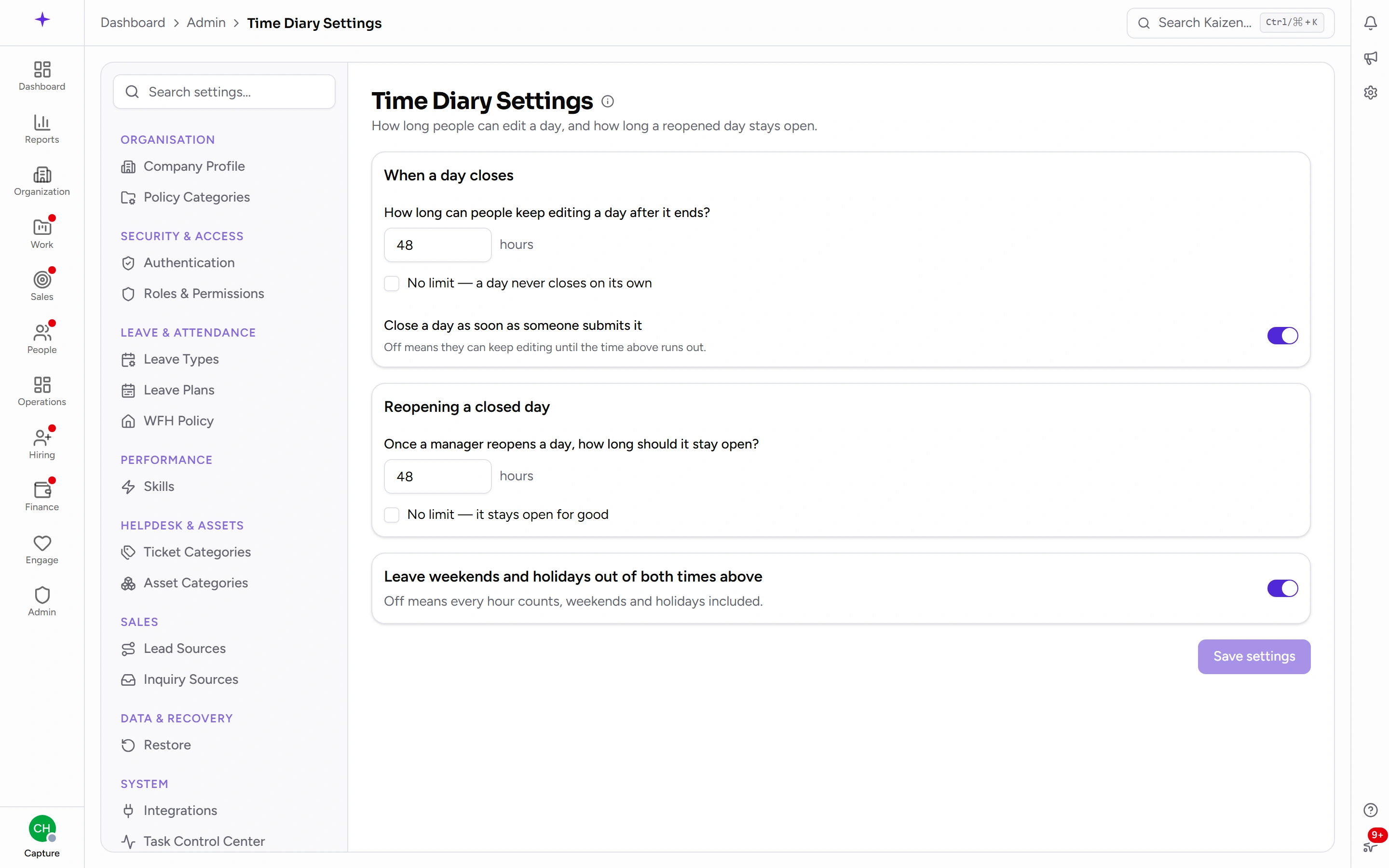
What's on the page
When a day closes
How long can people keep editing a day after it ends? — a number of hours. Once that long has passed, the day is closed and the person can no longer change it themselves.
Tick No limit — a day never closes on its own if you would rather days stayed editable indefinitely. Nothing then locks, and the reopening setting below stops mattering.
Close a day as soon as someone submits it is the other half of the same question, and it catches people out more often than the hours do. Left on, saving a day is final — the person is warned, and once they confirm, that day is done regardless of how much of the window is left. Switched off, saving is just saving: they can come back and correct the day until the time above runs out.
Which one you want depends on what you're protecting. On makes a submitted day a commitment. Off is kinder to people who fill their timesheet in as the day goes.
Reopening a closed day
A closed day is not closed forever. Someone can ask for it back, and a manager can reopen it — that request flow is covered on its own page.
Once a manager reopens a day, how long should it stay open? — again in hours, counted from the moment it is reopened. This is deliberately separate from the first setting: a reopened day usually needs a short, definite window rather than the full original one.
You can set this to no limit too, which leaves a reopened day open until somebody closes it another way.
Weekends and holidays
Leave weekends and holidays out of both times above decides how those hours are counted.
- On — only working time counts. A day ending on Friday evening will still be editable on Monday, because the weekend did not consume any of the allowance.
- Off — every hour counts, weekends and holidays included.
This one switch governs both settings above; you cannot count one way for the closing time and another for reopening. The holidays used are your company's own holiday list.
Common tasks
Change the deadline
Type the new number of hours and save. The change applies immediately — it is not a rule for future days only, it re-decides every day that is currently open.
That is why saving a shorter deadline asks you to confirm first. Kaizen works out how many days people can edit right now that would close the moment you save, and how many people that affects, and tells you before it does anything. If the number surprises you, that is the point — Save anyway goes ahead, and backing out costs nothing.
Anyone whose day closes this way has not lost the work already in it. They just cannot change it without asking for it back.
Stop days closing altogether
Tick No limit on the first setting. Existing closed days do not reopen — this changes what happens from now on, not what already happened.
Good to know
- This is one setting for the whole company. There is no per-person or per-team variation.
- Lengthening the deadline does not reopen closed days. A day that has already closed stays closed until somebody reopens it; the new, longer allowance applies to days still open.
- People are told, without coming here. Their time diary shows when the day they are looking at stops being editable, so nobody has to know what you set.
- Assistants read this too. If someone has connected an AI assistant, it reports your actual setting when asked whether a day can still be edited, rather than assuming a standard one.