

Hiring & recruitment
The hiring portal end to end — jobs, candidates, interviews, take-home assignments, offers, communications, and onboarding a new joiner.
What you can do here
- Run the whole recruiting process in one place: jobs, candidates, interviews, assignments, offers.
- Send take-home work and score it.
- Keep candidate correspondence together.
- Turn a hire into a real employee account.
The hiring portal opens in its own area. Use the way back to return to the main app.
The pipeline
Candidates move through Applied, Screening, Interview, Offered, Hired, and Joined. Drag a card between columns on the Pipeline, or change status on the candidate.
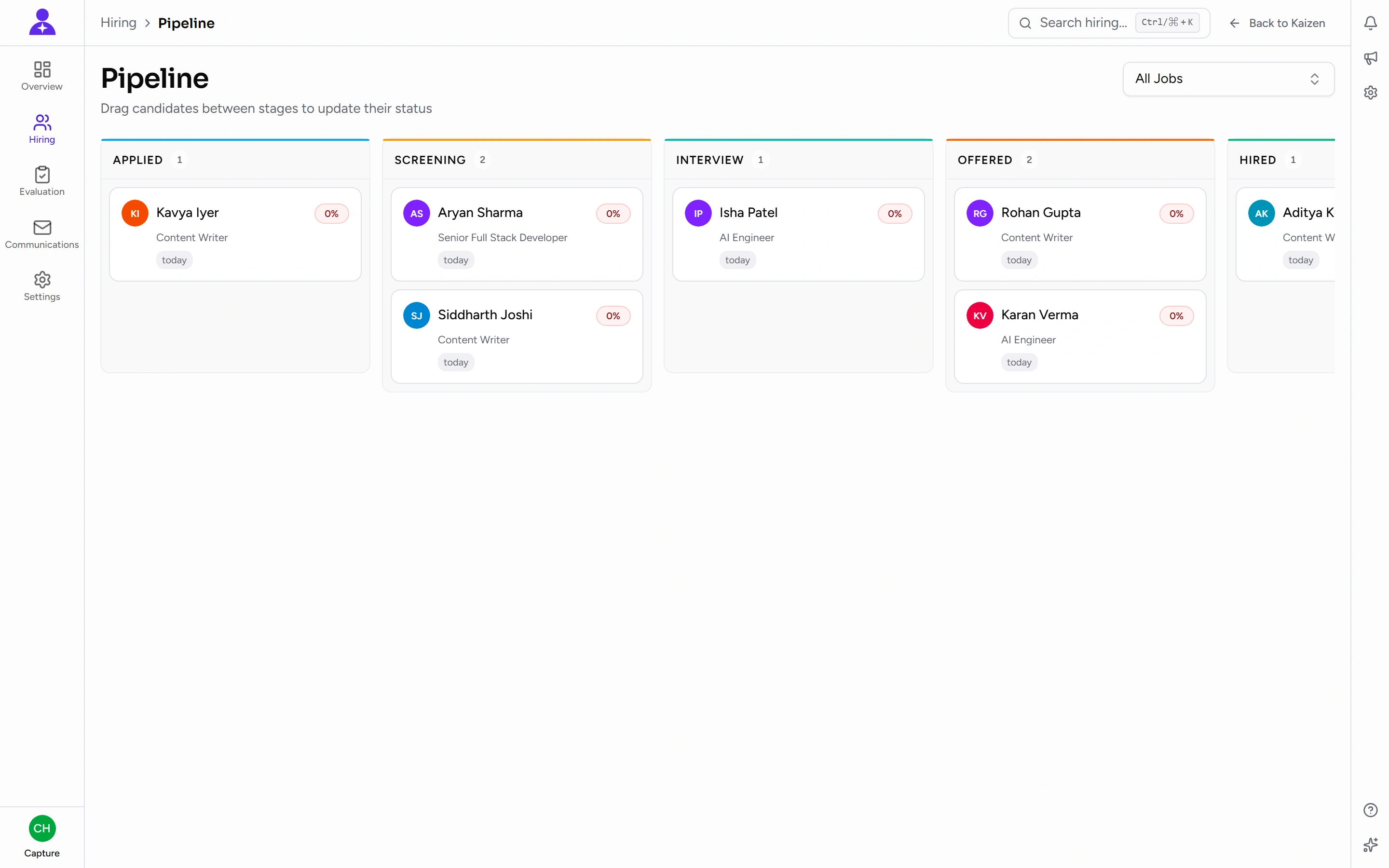
Rejecting captures a reason — worth writing properly, since it's what you'll rely on if the same person applies again.
The stages themselves are configurable in the hiring settings, so what you see may differ from the list above.
Common tasks
Post a job, and turn it into a public link
This is the piece that connects Kaizen to the outside world, so it's worth understanding properly.
1. Create the opening. Fill in the role details — title, department and designation, location, work mode, employment type, the experience range, how many positions, and the description and requirements.
Requirements are required, and they do more work than they look like they do. Type each one and press Enter; they become a list. Two things depend on it: applicants read them on the public advert under What you will need, and Kaizen scores every candidate against them.
If the description is already written, Fill from description reads it and offers the requirements it states. They're added to the list, never on top of what you typed, and nothing is saved until you save the job — so read them before you do. They land on a live job advert, and a requirement nobody meant to set is a hiring bar that quietly turns applicants away. The button stays disabled until there's a description to read from.
2. It starts as a Draft. A draft is internal. Nothing about it is reachable from outside, and its public address returns an expired page to anyone who tries.
3. Publish it. Use Publish on the job — from its own page or from the row in the jobs list. That flips it to Active, and at that moment its public page goes live.
4. Share the link. Every job has its own address, /careers/jobs/<job-title>, built from the title when the job is first created. That's the URL you put on LinkedIn, in a job board, or on your own website.
Candidates on that page see the role and an application form. What they submit — including their resume — arrives as a candidate in your pipeline at the Applied stage, marked as coming from the website, with the resume attached and analysed automatically. Their cover note is kept with them as a note. They land on a thank-you page; nobody has to create an account.
The form is protected against bots, so a real person filling it in occasionally has to confirm they're human. That's expected.
The résumé box tells applicants what it takes — PDF or Word, up to N MB — and the size in it is the one your server genuinely accepts, not a number typed into the page. An oversized file is stopped in the browser with that limit named, before anything is uploaded. Worth knowing because the failure it replaced looked like nothing to do with the file: past a certain size the upload was discarded whole, and the applicant was told their session had expired.
Closing a role takes the public page down the same way: a job that isn't Active sends visitors to an expired page instead of a form. Applications already received are unaffected.
Two things about that link are worth knowing:
- Renaming a job does not change its address. The link is fixed when the job is created — deliberately, so a URL already posted to a job board or sitting in somebody's inbox keeps working after an edit. It's the one place in Kaizen where a rename doesn't move the address.
- There is no public "all our jobs" page. Each opening is its own link. To list your openings on your own website, that's the feed described under Settings below.
Brand the careers page
Under Settings, your public career page carries your own logo, a primary and accent colour, and footer text. Candidates never see Kaizen's branding — they see yours.
There is also a read-only feed of your open jobs for your own website to pull from, so a careers section on your site can list current openings without anyone copying them across by hand. Setting it up needs a developer and an access key; ask whoever looks after your website.
Add a candidate
Add them directly, or convert a job inquiry that came through your website. Attaching a resume triggers an automatic analysis, and the resume can be viewed later from the candidate.
The match score, and when there isn't one
The analysis compares the resume against the job's requirements and puts a score on the candidate, shown on their page and as a bar in the candidates list.
Because the requirements are what the score is measured against, a job with no requirements produces no score at all — not a low one, and not a middling one. The candidate's page says This job has no requirements set, so candidates cannot be scored, with a link to edit the job, and the list shows a dash rather than a number. The tailored interview questions are unavailable for the same reason.
Fixing that means filling the job's requirements in and re-analysing, not re-analysing on its own. A missing score is a gap in the job, never a mark against the person — read it that way when you're comparing candidates on an older job.
Schedule an interview
Pick the candidate, the round type, and the Panel Members, then choose how the interview happens:
- Teams — Kaizen creates the Teams meeting itself and sends calendar invites to everyone taking part.
- External — a Zoom, Google Meet or other link you paste in yourself. Calendar invites are still sent.
- In-person — the candidate comes to you. Calendar invites are still sent, carrying the location instead of a link.
If the calendar invite fails, you're not stuck: the interview can retry the calendar step, or you can paste a meeting link in manually. Interviews can also be completed or cancelled, and there's a calendar view of what's coming up.
Connect Microsoft for Teams meetings and calendar invites
The Teams option only works once two separate things are true, and they're done by different people.
- Your company turns the integration on. Whoever administers Kaizen enables it in the authentication settings. Until then the Teams option is greyed out for everybody.
- You connect your own Microsoft account. Kaizen creates the meeting as you, from your calendar, so your own account has to be linked — being signed in to Kaizen with Microsoft isn't the same thing and isn't enough.
Once your company has step 1 done, you'll find a Connect Microsoft button in the header of the Interviews area. Click it, sign in to Microsoft, and approve the access. The button then shows the Microsoft address you connected, so you can tell at a glance which account meetings will come from.
Only people who schedule interviews ever see this button. If you don't, either you don't schedule interviews or your company hasn't enabled the integration yet.
To disconnect or switch accounts, click your Microsoft address in that header. Disconnect stops Kaizen creating or updating Teams meetings for interviews you schedule — meetings already in the calendar stay there — and Reconnect is how you re-approve or move to a different Microsoft account.
If the button ever changes to Reconnect Microsoft on its own, Microsoft has withdrawn the access — usually a password change or an expiry. Nothing is lost; clicking it and signing in again restores it.
You can still schedule interviews without connecting: choose External or In-person, and invites go out as normal.
Send a take-home assignment
Assignments are issued to a candidate and completed through the candidate portal — a passwordless link, like the client portal.
- Candidates submit through the portal.
- You score the submission and can download what they sent.
- If they say the link doesn't work, resend the portal link rather than starting over.
Make an offer
Create the offer, approve it, then send it to the candidate. Record their response when it comes. A PDF of the offer is available.
Accepting moves the candidate to hired.
Keep correspondence together
Communications holds candidate emails in one place, so the thread doesn't live only in one recruiter's inbox.
Onboard the new joiner
A hired candidate can be onboarded directly into a real employee account, including checking their sign-in name is available and re-issuing their initial access if needed.
This is the step that connects hiring to the rest of Kaizen — do it and the person exists as an employee, with a profile, a manager, and everything else.
Settings and analytics
Settings covers the general configuration, the pipeline stages themselves, automated triggers, and the feedback rubrics interviewers score against. Analytics shows how the funnel is performing.
Changing pipeline stages affects everyone's board, so it's worth agreeing before changing.
Good to know
- Interview feedback is separate. Interviewers score through their own area, and feedback stays hidden from them until they've submitted their own — covered on its own page.
- The candidate portal is passwordless and link-based, so a candidate saying "the link expired" is normal — reissue it.
- Rejection reasons and interview feedback are the two records that make a re-application easy to handle six months later. Both are worth the extra minute.