

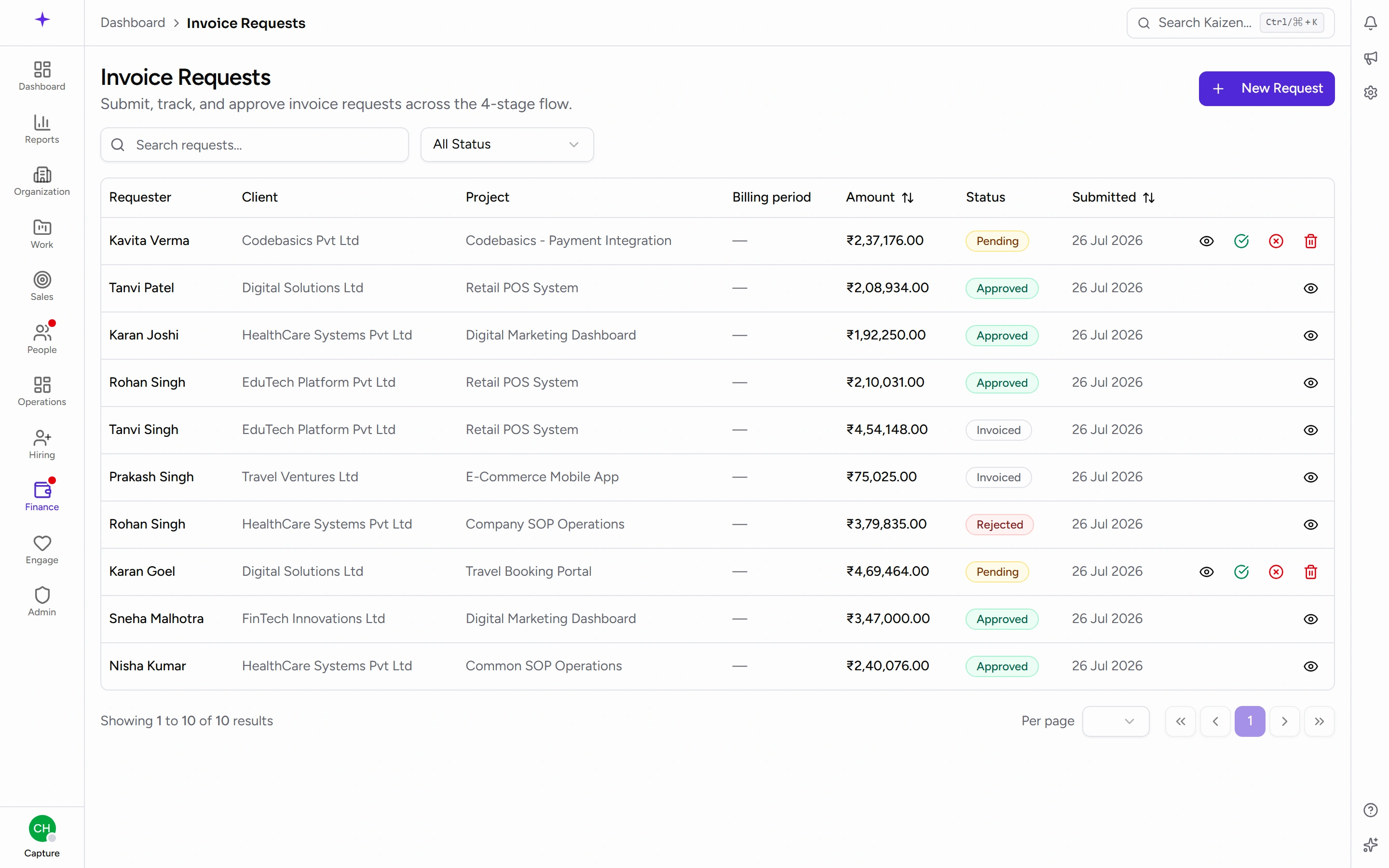
Raising an invoice request
Ask for a client to be invoiced — build the line items, send it through two approval stages, and follow it to a real invoice.
What you can do here
- Ask for a client to be invoiced, with the lines spelled out.
- Build those lines from time that's already been logged, rather than adding it up yourself.
- Send it through approval and watch where it is.
- See the real invoice once it exists.
You don't raise the invoice itself. You raise the request; finance turns an approved request into an invoice.
Raising one
- Start a new request.
- Choose the Sales client and the Project.
- Set the Billing period start and Billing period end.
- Pick the Currency.
- Add the Line items. Each has a Description, a quantity, a Rate, and an Amount, with a running Total underneath. Descriptions carry the weight here — something like AI Consulting — March 2026 sprint, Rutvik 95h + Likhitha 70h tells both the approver and the client what they're paying for.
- Add Notes for approver if there's anything Stage 1 or Finance should know.
- Submit.
Building it from logged time
Rather than totting hours up by hand, you can have the request previewed from the time logs for that client, project and period. It's faster, and it means the invoice matches what people actually recorded — which is the version you can defend if a client queries it.
How approval works
There are two stages, and both have to pass:
- Stage 1 — the commercial check.
- Stage 2 — finance.
The request's page shows a Stage history, so you can see exactly where it is and who has looked at it.
Either stage can reject, and the Rejection reason is required when they do — the prompt asks them to tell you what to revise. That reason is the whole point: read it, fix the request, and resubmit.
After approval
Finance creates the invoice from the approved request. The request then shows Created in Zoho and a Linked invoice, with a way through to the invoice itself.
From that point the invoice — its Due date, Amount, Status, and the client's Total outstanding — is the live record. The request stays as the audit trail of what was asked for and who agreed to it.
Good to know
-
Hover the client's name on a request to see who they are. A card appears with their industry, their Terms — the currency and the payment window, shown as Net 30 days or Due on receipt — and their contact person, email, phone and website. There's an arrow to open the full client record. It saves opening another tab to check who you're billing and on what terms.
Two things it may say instead: You do not have access to this client's contact details if your access doesn't extend to that client — the terms still show, because they're part of the request you're looking at — or No contact details on the client record yet if nobody has filled them in.
-
Get the billing period right. It's what ties the invoice back to the work, and it's what a client checks first when they query a bill.
-
Line items are per-request, not per-project, so a single request can bill several things — as long as the descriptions make sense to someone outside your team.
-
The currency comes from the client's setup. If the wrong one appears, fix it on the client record rather than working around it here.
-
A rejected request isn't a dead end. It's the fastest route to the version finance will accept — the reason field tells you what to change.