

Assets
See the equipment assigned to you, and — if you keep the register — record assets, assign them, and take them back.
What you can do here
- See what equipment you're currently responsible for.
- If you keep the register: record every asset with its purchase, warranty and condition details, and track where each one is.
The register
Assets sits under Operations in the sidebar — its breadcrumb reads Admin › Inventory, which is where the register belongs in the org's mind even though you reach it from Operations. Across the top are Total Assets, Available, Assigned, and Under Repair.
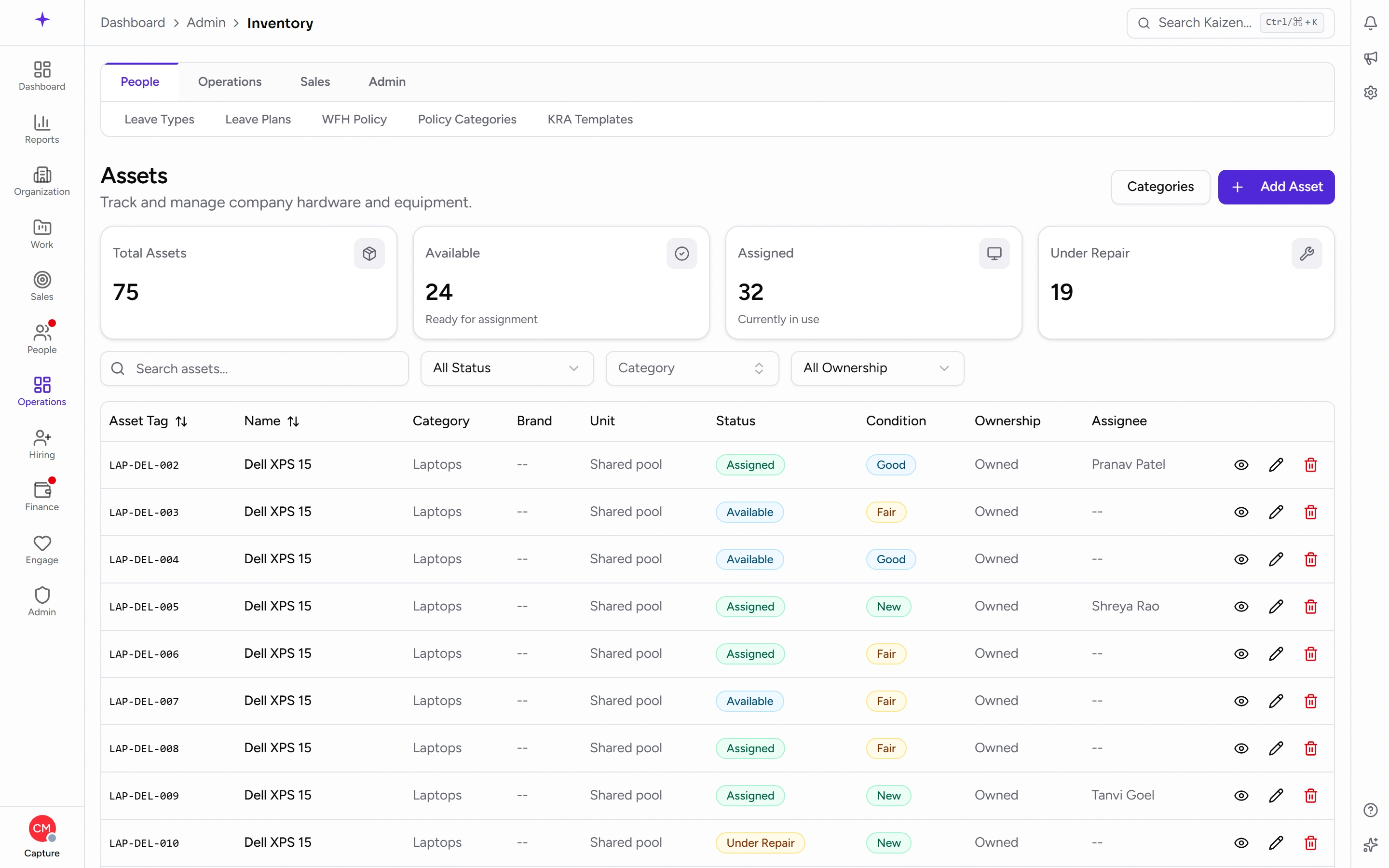
Each row carries the Asset Tag, Name, Category, Brand, Unit, Status, Condition, Ownership, and Assignee, with actions to view, edit, and remove. Filter by status, category, and ownership, and manage the category list from the same page.
Available against Total Assets is the number worth watching — spare equipment nobody has claimed is either a buying decision you don't need to make, or kit that's quietly gone missing.
What's assigned to you
Your Profile has an Assets tab listing what you currently hold. Opening Assets shows you the register scoped to your own items.
Worth a look when you join, when you change machine, and when you leave — it's the list you'll be asked to hand back.
Keeping the register
Add an asset
The form covers rather more than a name:
- Category and Asset Name
- Serial Number, Brand, Model Number
- Ownership Type — Owned or Rented
- Purchase Date, Purchase Cost, and Vendor, or a Monthly Rental Cost for rented items
- Warranty Expiry
- Condition — New, Good, Fair, or Poor
- Notes
An asset can also be marked as a shared pool item, company-wide rather than tied to one team.
Serial Number and Warranty Expiry are the two fields that pay off later — one identifies the machine in a support call, the other decides whether a repair costs anything.
Assign and return
Assign an available asset to an employee, recording its condition at handover. The person is notified.
When it comes back, return it and record the condition again. The asset becomes available for someone else.
Recording condition at both ends is the point. It's what turns "the screen was already like that" into a documented fact.
Statuses
Available, Assigned, Under Repair, Retired, and Lost.
Retired and Lost keep the record while taking the item out of circulation — better than deleting, because the purchase history and cost stay reportable.
Good to know
- Assets don't return themselves when someone leaves. Returning each item is a deliberate step, and skipping it leaves equipment attributed to someone who's gone.
- Software subscriptions aren't assets — seats are tracked under software licences.
- Rented assets carry a monthly cost rather than a purchase cost, so keeping ownership type accurate is what makes the register's totals mean anything.